
How EaseTrue Works
AI-powered fit scoring with 95%+ accuracy
Recommendation Pipeline
The Sizing Process
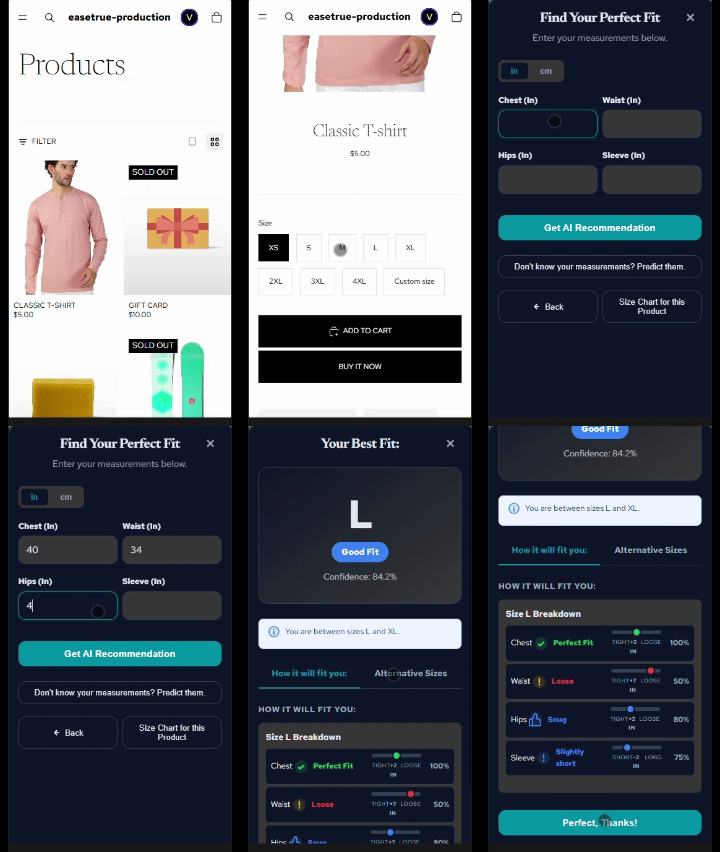
Step 1: Customer clicks "Check your size"
The widget opens as a modal. It auto-detects which size chart applies based on your conditional rules.
Step 2: Measurements collected
Customer enters body measurements — or uses the AI Predictor with just Height, Weight, and Age.
Step 3: Scoring engine calculates
For each size: Ease = Garment − Body. Scores how close ease is to your ideal range with priority weights.
Step 4: Best fit recommended
Highest-scoring size is recommended with confidence %. Visual breakdown of Perfect / Good / Acceptable / Poor.
Fit Scoring System
Step 1: The Core Calculation
AI converts Ease to 0-100 Score
Step 2: Threshold Evaluation
Perfect
Good
Acceptable
Poor
Accepting Made-to-Measure (Custom) Orders
EaseTrue isn't just for standard sizes. You can seamlessly accept fully custom, made-to-measure orders. Customers can enter this flow in two ways:
1. Direct Selection
Customers select the "Custom Size" variant directly on your Shopify product page. EaseTrue instantly pops up to collect their exact body measurements before they can add it to the cart.
2. AI Fallback
If a customer checks their size but their measurements fall below your minimum fit threshold (e.g., 60/100), the AI flags it as a poor fit and dynamically suggests a custom order to save the sale.
Automated Order Tagging & Production
Once they check out, the order is automatically tagged (e.g., EaseTrue-Custom) and their exact measurements are attached directly to the Shopify order notes. You can then manage the garment through the 7-stage production pipeline in your EaseTrue dashboard.
Save Once, Fit Anywhere
Customers can create a secure Body Profile directly inside their Shopify Customer Account via the EaseTrue Profile Manager. Once saved, their measurements automatically travel with them as they browse your store.
- Customer Account Integration: Shoppers navigate to their "My Account" portal to save their measurements or use the AI Predictor.
- Frictionless Shopping: Once their profile is created, the sizing widget instantly pre-fills their perfect size on every product page!